What does "agent-friendly" actually mean?
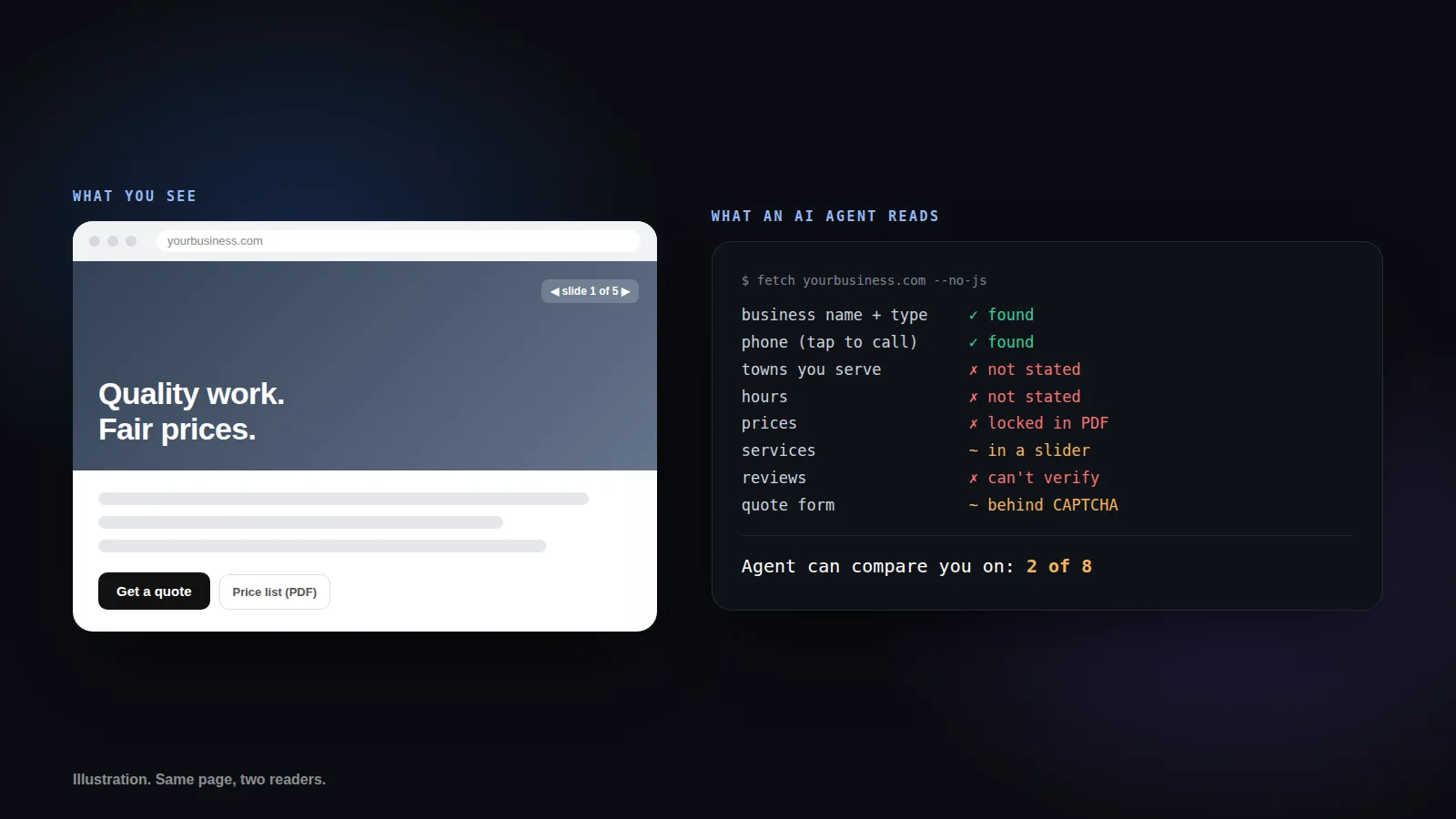
It means an AI assistant can find out who you are, where you work, what you do, what it costs and how to reach you, straight from your website, without guessing. If any of those answers is buried in a photo, a PDF, a slider or a pop-up, the agent usually never sees it.
A person browsing your site is patient. They scroll, they tap the slider, they open the price list. An AI agent working for a homeowner is not browsing. It fetches the page, pulls out the facts, compares them against two or three other contractors, and reports back. Whatever it could not read does not exist in that comparison.
That is the whole idea. You are not building a second website for robots. You are making sure the facts a customer needs are written down in plain text, in the page itself, where both people and software can get at them.
Why does this matter now and not in five years?
Because the agents are already making calls. At Google I/O on May 19, Google said that for categories like home repair, beauty and pet care, you can ask Google to call businesses on your behalf, rolling out to everyone in the US this summer. Meta's Muse started placing calls to US businesses on September 17.
Before an agent calls you, it decides whether to call you. That decision comes from what it can read: your website, your Google Business Profile, your reviews. A contractor whose site says "call for pricing" and lists no service area gives the agent nothing to work with, so it moves on to the one that does.
Most local sites are not ready. In July, TiltStack checked 62 Atlanta-area business websites for five basic machine-readable signals. Only 28% had all five, and 43% had zero or one, which in practice means close to invisible to an agent. Just 33% published their hours in a form a machine could read.
What are the ten things an agent needs from your website?
Permission to read it, text it can see without running scripts, and eight facts: who you are, where you work, when you are open, what you charge, what you do, proof from reviews, how to reach you, and a short plain-text summary. Here is each one, what the agent uses it for, and the quickest fix.
| # | What to check | Why an agent needs it | Quickest fix |
|---|---|---|---|
| 1 | AI crawlers allowed | A blocked assistant cannot recommend what it cannot read | Remove Disallow rules for GPTBot, ClaudeBot, PerplexityBot and Google-Extended in robots.txt, unless you blocked them on purpose |
| 2 | Readable without JavaScript | Many agents fetch the raw page and never run scripts | Put services, area and prices in the page HTML, not in sliders, pop-ups or images |
| 3 | Business identity | Confirms exactly who you are | Add LocalBusiness schema (or Plumber, RoofingContractor and so on) with name, phone and address |
| 4 | Service area | Answers "do they cover my town?" | List every town or county in text and in areaServed |
| 5 | Hours | Agents skip businesses they cannot confirm are open | Add openingHoursSpecification, and say if you take emergency calls |
| 6 | Prices or ranges | An agent comparing quotes can only compare what it reads | Publish "from" prices or typical ranges for your top services |
| 7 | Individual services | Matches "gutter guard install" to a real service | Give each main service its own section, and list them in schema |
| 8 | Verifiable reviews | Lets an agent check you are legitimate | Link your Google Business Profile and review sites, and add them to sameAs |
| 9 | A way to reach you | No contact path means no call and no quote request | Tap-to-call number plus a short form, with no CAPTCHA on first contact |
| 10 | llms.txt | A plain-text summary written for AI assistants | Add /llms.txt with services, area, prices, hours and contact info |
Structured data, if the term is new, is a small block of code in your page that states facts in a format machines read reliably: your business type, phone number, hours, service area. Visitors never see it. Agents read it first.
Which fixes matter most if you only do three?
Make the page readable without JavaScript, put a tap-to-call number and a simple form on the homepage, and publish price ranges. Those three decide whether an agent can understand you, reach you and compare you, and everything else builds on them.
Readable without JavaScript comes first because nothing else counts if the page looks empty. In a set of 190 controlled tests published by Vercel, that a fetch-only client could not retrieve an answer that existed only after JavaScript ran. Some site builders render the entire page with scripts. If yours does, that is the one problem you cannot fix by editing text.
A contact path comes second because the end goal of every agent task is a call, a message or a booking. A phone number in an image, a form behind a bot challenge, or a "contact us" page three clicks deep all stop it cold.
Prices come third because comparing is what agents are for. When a homeowner asks for three quotes on a gutter cleaning, the contractor who wrote "most cleanings run $150 to $300" can be compared. The one who wrote "call for a free estimate" cannot.
What should you avoid doing?
Do not lock key facts in PDFs or images, do not put a CAPTCHA in front of your first-contact form, do not block AI crawlers by accident, and do not fill llms.txt or your schema with claims your business cannot back up.
The accidental block is more common than you would think. Cloudflare, which sits in front of a large share of small business sites, started blocking AI crawlers by default for new sites in July 2025, and plenty of owners never knew it happened. Check your robots.txt, or run the free check below, which reads it for you.
The last one matters as much as the rest. AI assistants already weigh your reviews and Google Business Profile alongside your website. Inflated claims, fake review counts or "serving all of New Jersey" when you really cover two counties will cost you trust with the software the same way they cost you trust with people.
How do you check your own site?
Run your homepage through the free AI readiness check. It reads your site the way an agent does, scores the ten signals above out of 100, and tells you exactly what to fix. It takes about ten seconds and you do not need to enter an email.
A score of 80 or more means agents can read and act on your site. Between 50 and 79 they can see part of it. Under 50, most AI assistants are working blind, and your competitors with clearer sites are winning comparisons you never knew you were in.
We fix all ten as part of every Atlas website. If you would rather not touch robots.txt or schema yourself, that is what we are here for.